


Videocast 5 Channel PTZ Camera Controller VC 501
.webp)
.webp)
.webp)
.webp)
Key Features
⏩Multi-Camera Support
Controls up to 5 PTZ cameras simultaneously, each on its own dedicated channel.
⏩ Protocol Compatibility
Supports multiple PTZ control protocols: VISCA, Pelco-D, Pelco-P, along with RS-232, RS-422, RS-485 serial communication.
⏩IP & Network Interface
Includes LAN / Ethernet connectivity (RJ45) plus separate RJ45 ports for each channel (RS232/485). Allows remote/IP-based control.
⏩Control of Key Camera Parameters
Direct control over Pan, Tilt, Zoom, PTZ speed, Focus, Iris, Brightness, White Balance, and Red/Blue color adjustments. Also supports selecting different exposure modes.
⏩3-inch LCD Monitor
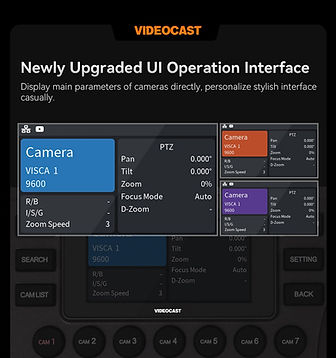
Built-in 3″ color display for status information, camera selection, etc. (display in English) to monitor and navigate controller settings.
⏩Preset Memory
Can store up to 10 presets that can be recalled quickly.
⏩ User Input Controls
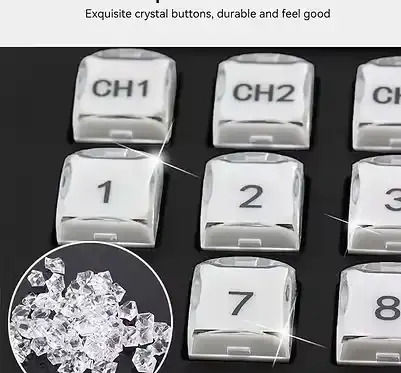
3-D joystick for pan/tilt/zoom movement; speed control through dedicated buttons.
⏩ Wide Compatibility & Use-Cases
Works with a range of common PTZ camera brands that support the above protocols; suitable for broadcasting, live events, church, stage shows etc.

Fast Camera Switching


Support 7 Cameras


UI Operation Interface



Key Applications
✅ Live Event Production
Smoothly control multiple PTZ cameras during concerts, conferences, exhibitions, and award shows.
✅ Broadcasting & TV Studios
Used in newsrooms, talk shows, and studio production for precise camera movements and preset switching.
✅ Houses of Worship (Church, Temple, Mosque)
Enables easy camera operation for live streaming religious services and ceremonies.
✅ Corporate Meetings & Webinars
Ideal for boardrooms, town halls, training sessions, and hybrid events requiring multi-camera coverage.
✅ Education & E-Learning
Used in classrooms, lecture halls, and online training setups for recording and streaming lectures.
✅ Sports & Esports Production
Controls multiple angles of action, providing dynamic coverage for stadiums, arenas, or gaming events.
✅ Government & Public Sector
Deployed in parliaments, council chambers, and courtrooms for official recording and live broadcast..
✅Healthcare & Telemedicine
Remote camera operation for surgeries, medical training, and virtual consultations.
✅Security & Surveillance
PTZ controllers provide reliable manual control for monitoring critical areas in real time.
✅Streaming Studios & Content Creators
Perfect for YouTube, Facebook, or professional podcasting setups needing smooth camera transitions.
.webp)
.webp)
Our PTZ Camera Controller Solutions

Live Streaming

.png)
Education

.png)
Wedding Live

.png)
Sport

.png)
Conference

.png)
Church
Frequently Asked Questions (FAQ)
1. What is the VC501 PTZ Camera Controller?
The VC501 is a professional device used to control PTZ cameras, including pan, tilt, zoom, and camera settings.
3. What connection protocols does it support?
It supports common PTZ control protocols including VISCA, Pelco-D, Pelco-P, and IP control (VISCA over IP, ONVIF, NDI optional).
5. Can I save preset camera positions?
7. How do I control camera movements?
Use the 3D joystick and dedicated buttons to adjust pan, tilt, zoom, speed, and other settings smoothly.
9. What environments is this controller ideal for?
It’s suitable for broadcasting, live events, houses of worship, education, corporate meetings, and streaming setups.
2. How many cameras can this controller manage?
It can control up to 5 PTZ cameras simultaneously, each on its own dedicated channel.
4. Do I need a network to control cameras?
Yes, you can connect via LAN/Ethernet for network control, or use the serial ports (RS-232/RS-422/RS-485) for direct serial control.
6. Does the controller have a display?
Yes, it features a built-in 3-inch LCD screen for viewing status, menus, and camera selections in English.
8. Will it work with different camera brands?
Yes, as long as the camera supports one of the controller’s supported protocols (VISCA, Pelco, ONVIF, IP) it should work.
10. What power options does this controller support?
You can power it using 12V DC or through PoE when using IP control, depending on your setup.