


VIDEOCAST 2 Channel HDMI USB 3.0 Video Capture Card Device with Loop Out Mixer
.webp)
.webp)
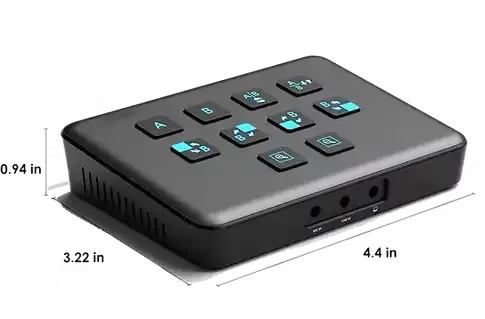

Key Features
⏩Dual HDMI Inputs
You can connect two separate HDMI video sources simultaneously.
⏩ Loop-Out HDMI Output
It provides an HDMI loop-out, so you can send the video signal (or a mixed view) to another display or monitor without interrupting or affecting the capture process.
⏩USB-C / USB 3.0 Output
Captures video via USB 3.0 (USB-C) to a computer, providing higher bandwidth and lower latency compared to USB 2.0.
⏩Supported Resolutions
Supports inputs up to 4K@30Hz and 4K@60Hz; output / capture via USB is generally 1080p, depending on the settings.
⏩ Mixing & Switcher / PIP
It has built-in video mixing capabilities: you can switch between the two HDMI sources, and it offers picture-in-picture (PiP) modes
⏩ Audio Inputs / Outputs
There are additional audio input options: a line-in and a mic input. Also audio output (e.g. headphone) and audio embedding via HDMI.
⏩ Plug-and-Play / UVC / UAC
Works with UVC (USB Video Class) and UAC (USB Audio Class) standards, so it should be recognized by many systems (Windows, Mac, etc.) without special drivers.
⏩ HDR & HDCP
Supports HDR input (4K/60Hz) and is backward compatible. HDCP support is mentioned.
⏩ Portable / Compact Design
Relatively compact and suited for streaming / live-use / content-creation setups.

Unique Design
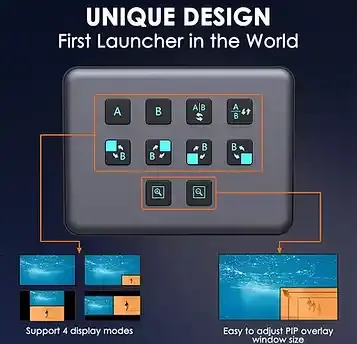

Plug and Play


4 Display Module


.webp)
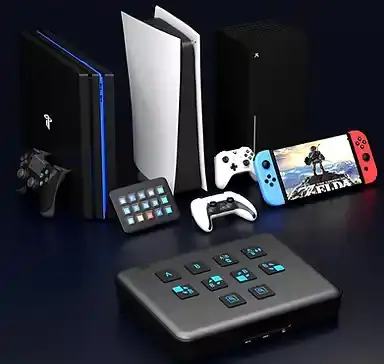
Key Applications
✅ 🎥 Live Events & Stage Shows
Multi-camera production for concerts, seminars, and conferences.
✅ 🏫 Education & Online Classes
Professional streaming for schools, colleges, and training centers.
✅ 🙏 Houses of Worship
Streaming church services, prayers, and spiritual events.
✅ 💼 Corporate Meetings & Webinars
Smooth switching for hybrid meetings, presentations, and launches.
✅ 📰 News & Media Broadcasting
Multi-source live news coverage and interviews.
✅ 🎮 E-Sports & Gaming Streams
Switch between gameplay, commentary, and live cams.
✅ 📱 Social Media Streaming
Direct live streaming to YouTube, Facebook, Zoom, Teams, and OBS.
✅🎤 Talk Shows & Interviews
Picture-in-picture and split screen for guests and hosts.
✅🎬 Film & Video Production
On-set monitoring and live switching for production teams.
✅🛍️ E-Commerce & Product Demos
Showcase multiple camera angles for live selling.


Our Video Switcher Solutions

Live Game

.png)
Education

.png)
Wedding Live

.png)
Sport

.png)
Conference

.png)
Church
Frequently Asked Questions (FAQ)
1. What is this device?
It’s a 2-channel HDMI USB 3.0 video capture card with a built-in mixer, allowing you to capture, switch, and mix two HDMI video sources into your computer via USB.
3. What video resolutions are supported?
The card supports up to 4K HDMI input and usually captures at 1080p60 through USB to the computer.
5. Can I monitor the video while capturing?
Yes — thanks to the HDMI loop-out output, you can view the live feed on a monitor while capturing.
7. What mixing features does it have?
Built-in video switching, picture-in-picture (PiP) and mixing so you can change sources smoothly while streaming/recording.
9. What is the USB connection type?
It uses USB-C / USB 3.0 for faster data transfer and low latency capture.
2. Do I need drivers to use it?
No — it uses UVC (USB Video Class) and UAC (USB Audio Class), so most systems (Windows, Mac, Linux) recognize it without extra drivers.
4. How many cameras/devices can I connect at once?
You can connect two HDMI video sources simultaneously (e.g., two cameras, or a camera + game console).
6. Does it include audio support?
Yes — it has audio inputs (line/mic) and outputs, plus HDMI audio embedding.
8. What software does it work with?
Compatible with popular streaming and recording software like OBS Studio, XSplit, Zoom, Teams, YouTube Live, etc.
10. Is this suitable for professional and live use?
Absolutely — ideal for live events, multi-camera productions, webinars, gaming streams, education, and corporate broadcasts.